
Download Zed – Chrome Apps, text editor, code editor, offline, file manager
Overview
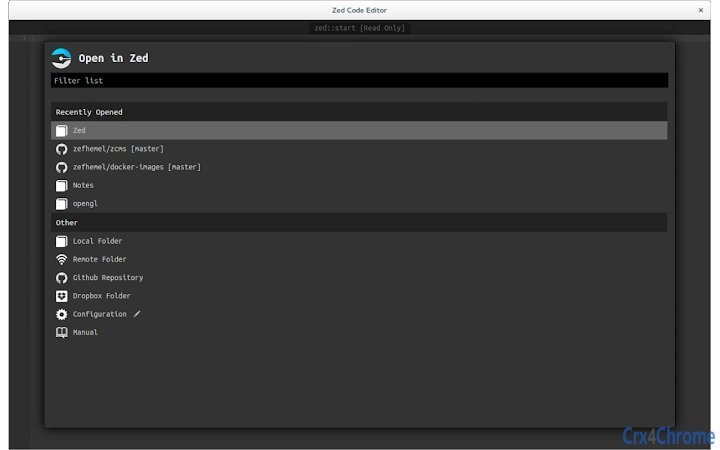
Zed is a modern, desktop-based text and code editor designed for developers who value speed, simplicity, and seamless file management across local and remote environments. Built on web technologies, it offers a fully offline-capable experience while supporting integration with cloud services like Dropbox and GitHub, as well as remote server editing via any Internet-connected machine. The editor eliminates traditional UI clutter by removing tabs and open file concepts, replacing them with a streamlined navigation system using a unified goto interface (Command-E/Ctrl-E) and a file tree (Command-T/Ctrl-T).
Its core philosophy centers on reducing cognitive load during coding—allowing users to focus on writing code rather than managing files or switching between tools. The editor automatically creates missing directories when a new file is referenced, treating file paths as namespaces. This feature simplifies project organization and reduces friction when setting up new files. Zed also persists edit state between sessions, including window layout, cursor positions, selections, undo history, and split view configurations, all stored in a .zedstate file within the project directory.
Target users include developers, software engineers, and technical teams working on local, cloud-based, or remote projects. It is particularly well-suited for those who frequently switch between environments or rely on consistent editing experiences across devices. While the developer did not provide additional background details, the project’s open-source nature under the MIT license enables transparency and community contributions.
Key Features & Capabilities
- Syntax Highlighting – Supports a broad range of programming languages including C, Clojure, CoffeeScript, C#, CSS, Dart, Erlang, Go, Haskell, HTML, JavaScript, JSON, Lua, Markdown, Python, Ruby, Shell, XML, and more. This ensures accurate visual parsing of code, improving readability and reducing errors.
- Code Completion – Offers intelligent symbol suggestions and customizable snippets, enabling faster coding and consistent formatting across projects.
- Built-in Linting – Provides inline error markers for JavaScript, CoffeeScript, JSON, Lua, and CSS, helping developers catch issues early without leaving the editor.
- Multiple Cursors – Allows simultaneous editing across multiple lines or locations, streamlining repetitive tasks like renaming variables or adjusting formatting.
- Split-View Editing – Enables side-by-side comparison and editing of multiple files or sections, improving workflow efficiency during debugging or refactoring.
- Unified File Navigation & Creation – The goto UI combines file browsing and creation in one interface. Users can open existing files or create new ones—including parent directories—by simply typing a path.
- Remote Server Editing – Supports direct editing of files on any Internet-connected server, eliminating the need to switch to command-line tools like nano or vi.
- Project Persistence – Saves window size, cursor position, undo history, and split view state between sessions, ensuring continuity across work sessions.
- Open Source & Extensible – Built using HTML, JavaScript, and CSS, with full access to the source code under the MIT license. Users can customize language modes, key bindings, themes, and commands directly within the editor.
These features collectively enhance productivity by minimizing context switching, reducing setup overhead, and supporting both local and distributed workflows. The editor’s design encourages a focused, distraction-free coding experience while maintaining flexibility for complex development environments.
User Interface, Workflow & Performance
Zed’s user interface is minimalist and purpose-built for efficiency. It removes traditional tabs and file open states, relying instead on a compact edit bar at the bottom of the screen to indicate the current file. Navigation is handled through two primary methods: the goto UI (Command-E/Ctrl-E) and the file tree (Command-T/Ctrl-T), both of which prioritize speed and clarity. Recently opened files appear at the top of the list, making quick access intuitive.
Workflow efficiency is enhanced by the editor’s unified file creation and navigation system. Typing a path like src/components/Button.js will either open the file if it exists or create it with all necessary parent directories. This eliminates the need to manually create folders, streamlining project setup and reducing cognitive overhead.
The editor persists user state between sessions, including window size, cursor position, selections, undo history, and split view layout—all stored in a .zedstate file within the project directory. This ensures continuity when returning to a project after a break.
Performance observations are based on general software behavior patterns. The developer did not specify resource usage details. However, being built on web technologies and designed for offline use, Zed likely maintains low CPU and RAM consumption during typical operations. Stability is expected to be high due to its modular architecture and open-source foundation.
Compatibility & System Requirements
Zed is compatible with Windows, Mac, and Linux operating systems, making it accessible across major desktop platforms. It is available as a standalone desktop application with a file size of 150 MB, suitable for installation on systems with standard storage capacity.
Exact system requirements were not listed. The developer did not provide additional details about minimum hardware specifications such as RAM, processor speed, or GPU capabilities. Compatibility information was partially provided, indicating support for mainstream desktop environments.
Given its reliance on web technologies, Zed may perform well on systems with modern browsers and adequate memory, though specific performance benchmarks were not disclosed.
Pros and Cons
Pros
- Full offline capability with seamless remote editing support
- Minimalist interface reduces visual clutter and cognitive load
- Unified file navigation and creation simplifies project setup
- Automatic directory creation when saving new files
- Project state persistence across sessions
- Open source under MIT license with full extensibility
- Supports cloud and remote file systems (Dropbox, GitHub, servers)
- Built using standard web technologies (HTML, CSS, JavaScript)
Cons
- No detailed system requirements provided
- Performance metrics not specified by developer
- Learning curve for users accustomed to tab-based editors
- Limited built-in language support compared to full IDEs
- Customization requires familiarity with web development concepts
FAQ Section
Is Zed available for all major operating systems?
Yes, Zed is compatible with Windows, Mac, and Linux operating systems.
Can I use Zed without an internet connection?
Yes, Zed is fully offline-capable and can be used to edit files locally or on remote servers without requiring a continuous internet connection.
Is Zed safe to download and use?
Yes, Zed is a secure desktop application. As an open-source project under the MIT license, its code is publicly available for review, enhancing transparency and trust.
Does Zed support remote file editing?
Yes, Zed provides first-class support for editing files on any Internet-connected server, allowing direct access without switching to terminal-based editors.
Can I extend Zed with custom features?
Yes, because Zed is built with web technologies and open source under the MIT license, users can create custom language modes, key bindings, themes, and commands directly within the editor without modifying the core codebase.
Final Thoughts + CTA
Zed stands out as a thoughtfully designed code editor that prioritizes productivity, simplicity, and consistency across diverse development environments. Its unique approach—removing tabs and open file concepts—streamlines navigation and reduces distractions, making it ideal for developers who value focus and efficiency. The ability to edit files locally, on cloud platforms like Dropbox and GitHub, or remotely on servers, combined with project persistence and automatic directory creation, makes it a versatile tool for modern workflows.
While detailed system requirements and performance data were not provided, the editor’s lightweight footprint and use of standard web technologies suggest broad compatibility and stable operation. Its open-source nature invites transparency, customization, and community-driven innovation.
For developers seeking a fast, clean, and extensible code editor that works seamlessly across devices and environments, Zed delivers a compelling solution. Whether working solo or in teams, users benefit from a consistent, reliable, and future-ready editing experience.
Download Zed now







